Circles – Architecture & Identity Deep Dive
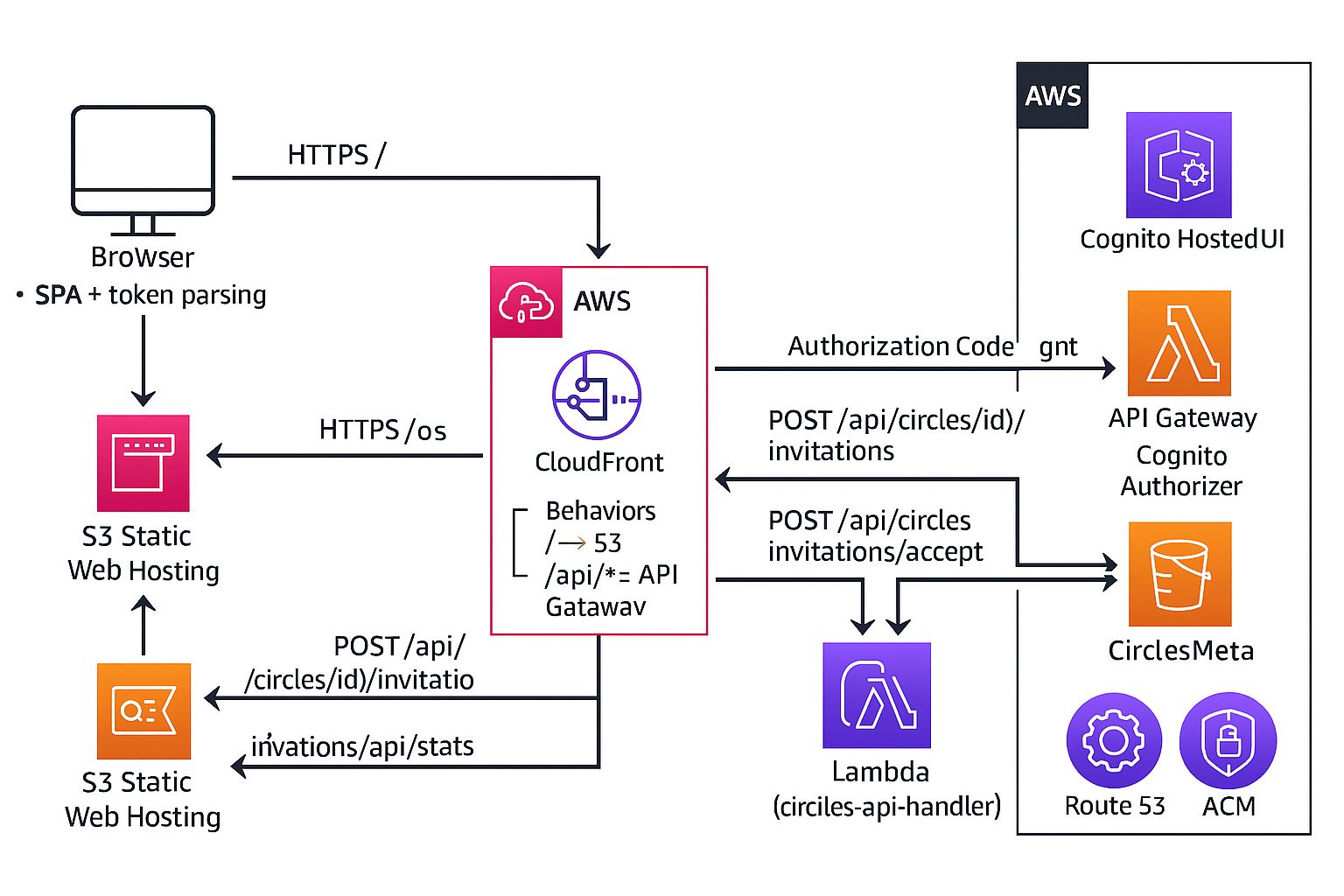
This appendix provides a deeper view into the technical and architectural choices behind the Circles app: how the system is wired, how identity and authorization work, and how the data model supports per-circle access control.
1. System Overview
Circles is built as a fully serverless web application on AWS. The design emphasizes a small, well-defined attack surface, straightforward scaling, and a modern cloud identity model.
- UI & Static Assets: S3 (private) + CloudFront
- API Surface: API Gateway (REST) with a
/prodstage - Business Logic: AWS Lambda (Node.js 20)
- Data: DynamoDB tables for messages, circles, memberships
- Identity & Auth: Amazon Cognito User Pool + Hosted UI + JWT
- Routing & Domain: CloudFront + Route 53 + ACM TLS
2. Request Flow: Browser → CloudFront → API → DynamoDB
The basic message flow looks like this:
-
The user navigates to
https://circles.behrens-hub.com. CloudFront serves the SPA (HTML/JS/CSS) from a private S3 bucket via an Origin Access Identity. -
When the SPA loads, it:
- Parses any tokens from the URL fragment (if returning from Cognito)
- Shows signed-in state and the current user
- Calls
GET /api/circles/configto discover which circles the user belongs to - Loads messages for the selected circle via
GET /api/circles?familyId=…
-
All API requests go through CloudFront, which routes
/api/*to API Gateway. API Gateway is configured with:- A Cognito User Pool authorizer
- A
/prodstage - Methods that proxy to a single Lambda function
-
When the user posts a message:
- The SPA sends
POST /api/circleswith JSON body and anAuthorization: Bearer <id_token>header. - API Gateway validates the JWT using the Cognito authorizer.
- If valid, claims are injected into
event.requestContext.authorizer.claimsfor the Lambda to consume.
- The SPA sends
-
Lambda:
- Extracts the user’s
sub(userId) and other claims (e.g., email, name) - Checks the
CircleMembershipstable to ensure the user is allowed to read or write in the requested circle - Reads or writes data in
CirclesMessagesas appropriate - Returns a JSON response back through API Gateway → CloudFront → browser
- Extracts the user’s
3. Data Model: Messages, Circles, Memberships
DynamoDB is used for its simplicity, scalability, and pay-per-request pricing. The data model is minimal but intentional.
3.1 CirclesMessages
Stores all messages for all circles.
- Table:
CirclesMessages - Partition key:
familyId(string) – effectively the circle ID - Sort key:
createdAt(string, ISO timestamp)
Example item:
{
  "familyId": "behrens",
  "createdAt": "2025-12-04T18:22:11.123Z",
  "author": "Scott",
  "text": "Hello from the real Circles API!"
}
3.2 Circles
Stores metadata for each circle.
- Table:
Circles - Partition key:
circleId(string)
Example item:
{
  "circleId": "behrens",
  "name": "Behrens Family",
  "description": "Primary family circle"
}
3.3 CircleMemberships
Defines who belongs to which circles, and with what role.
- Table:
CircleMemberships - Partition key:
userId(Cognitosub) - Sort key:
circleId(string) - Additional fields:
role,joinedAt
This layout makes it very easy to:
- List all circles a user belongs to (one query on
userId) - Check whether a user can access a specific circle (look up
{ userId, circleId }) - Extend into role-based behavior (owner, member, etc.) later
4. Identity & Authorization
Because I’ve spent much of my career working with enterprise identity, RBAC, and SSO, I wanted Circles to use a modern identity pattern rather than a toy implementation. The stack centers on Amazon Cognito and JWTs.
4.1 Cognito Setup
- Cognito User Pool for managing users
- User Pool Client configured for a browser-based SPA (no client secret)
- Hosted UI for sign-in and sign-up
- Implicit flow using
response_type=tokenfor this demo - Redirect URI:
https://circles.behrens-hub.com/
In production, I would shift this to Authorization Code + PKCE for stronger security and refresh token support, but the current setup keeps the demo code simple while still demonstrating the core identity patterns.
4.2 Token Flow
-
The user clicks "Sign in" in the SPA. The browser redirects to the Cognito
Hosted UI
/oauth2/authorizeendpoint with:client_idresponse_type=tokenscope=openid email profileredirect_uri=https://circles.behrens-hub.com/
-
After sign-in, Cognito redirects back to the SPA with an
id_token(andaccess_token) in the URL fragment. -
The SPA parses the fragment via
window.location.hash, extracts the tokens, and stores them inlocalStoragealong with decoded claims. -
All API calls include:
Authorization: Bearer <id_token> -
API Gateway’s Cognito authorizer validates the token and injects claims into
event.requestContext.authorizer.claimsfor Lambda.
4.3 Backend Authorization (Zero Trust)
A key design choice was to enforce circle membership on the backend. The SPA is not trusted to decide what circles a user may see.
At a high level, each request is handled as follows:
- Lambda reads
userId = claims.subandauthorName = claims.name || claims.email - For
GET /api/circles, if afamilyIdis specified:- Lambda checks
CircleMembershipsfor{ userId, circleId: familyId } - If no record is found, it returns
403 Forbidden
- Lambda checks
- For
POST /api/circles:- Same membership check is performed
- If allowed, Lambda writes the message using
authorNamefrom the JWT, not from the client body
This pattern mirrors how I’d handle authorization in a larger system: frontend drives the experience, but the backend is the source of truth for “who can access what.”
5. Secure SDLC Maturity
From a secure SDLC perspective, Circles follows a staged maturity model. Security is not an afterthought, but it is also not overbuilt for a small demo.
- Stage 0 – Infrastructure defaults: private buckets, HTTPS-only access, IAM least privilege, CloudFront as the only public edge.
- Stage 1 – Authentication: Cognito User Pool + Hosted UI with JWT-based sign-in; API Gateway authorizer ensures only authenticated users reach the Lambdas.
- Stage 2 – Authorization: DynamoDB-backed circle membership, enforced in Lambda using userId from JWT claims.
- Stage 3 – Future enhancements: planned evolution to Authorization Code + PKCE, richer roles, audit logging, and monitoring as needed.
The goal isn’t to turn a small demo into a security product; it’s to show that I understand how to layer appropriate controls over time while keeping cost and complexity aligned with the product’s stage.
6. Cost & Simplicity
Cost sensitivity was an explicit design constraint. The architecture avoids NAT gateways, long-running compute, and unnecessary managed services. Instead, it leans on:
- Pay-per-request DynamoDB tables
- Serverless Lambda functions
- CloudFront caching and edge delivery
- Cognito’s fully managed identity service
The intent was to build the simplest secure system that could deliver the MVP, while leaving space to evolve if usage grows. The re-architecture cost of scaling up later is lower than the cost of overbuilding up front.
7. Summary
This deep dive reflects how I think about architecture and identity when I’m wearing both the product and technical hats. Even in a small app, the principles are the same as in larger initiatives: clear boundaries, identity-first design, minimal trusted surfaces, and a bias toward simple, evolvable systems.
For teams, it means I can converse comfortably with engineers, architects, and security specialists – and still keep the conversation grounded in user value and business outcomes.